
Powered by BroadcastSIMS
Build Your Broadcast Crew in the Classroom
Live production simulations and ready-to-teach lessons that train students to switch, replay, mix, and direct, then put them to work on your HometownLive streams.
Visit BroadcastSIMSAt a glance
- Six browser-based live production simulations
- Ready-to-teach lessons, readings, rubrics, and assessments
- Runs on computers and Chromebooks, no production equipment needed
- Aligned to CTE and industry standards
- Educator dashboard for classes, assignments, and progress
- Included with All Access, or $995/year as an add-on
Every Stream Needs a Crew
The best crew for your broadcasts is already in your building. The hard part is training them. Production gear is expensive, there is never enough of it for a whole class, and the teacher assigned to an A/V course often comes from journalism, not a control room.
BroadcastSIMS solves both problems. Every student gets a seat in a realistic control room on a laptop or Chromebook, and every simulation comes with complete lessons, so teachers can run a full course without building materials from scratch.
One Simulation for Every Seat in the Control Room
Students start with the fundamentals in A/V Club, then step into each production role. Footage and scenarios are refreshed every year.
The starting point
A/V Club
Introduces the fundamentals of audio and video production before students take on a specific role.
Technical Director
SwitcherSIM
Camera switching, transitions, and keeping pace with a live show.
Replay Operator
ReplaySIM
Isolating the key moment and delivering the replay on cue.
Director
DirectorSIM
Calling shots, coordinating the crew, and running the show.
Audio Engineer
AudioSIM
Mixing, balancing, and managing live audio at broadcast quality.

Graphics Operator
GraphicsSIM
Building and triggering lower thirds, scoreboards, and on-screen graphics.
Real Footage, Real Interfaces
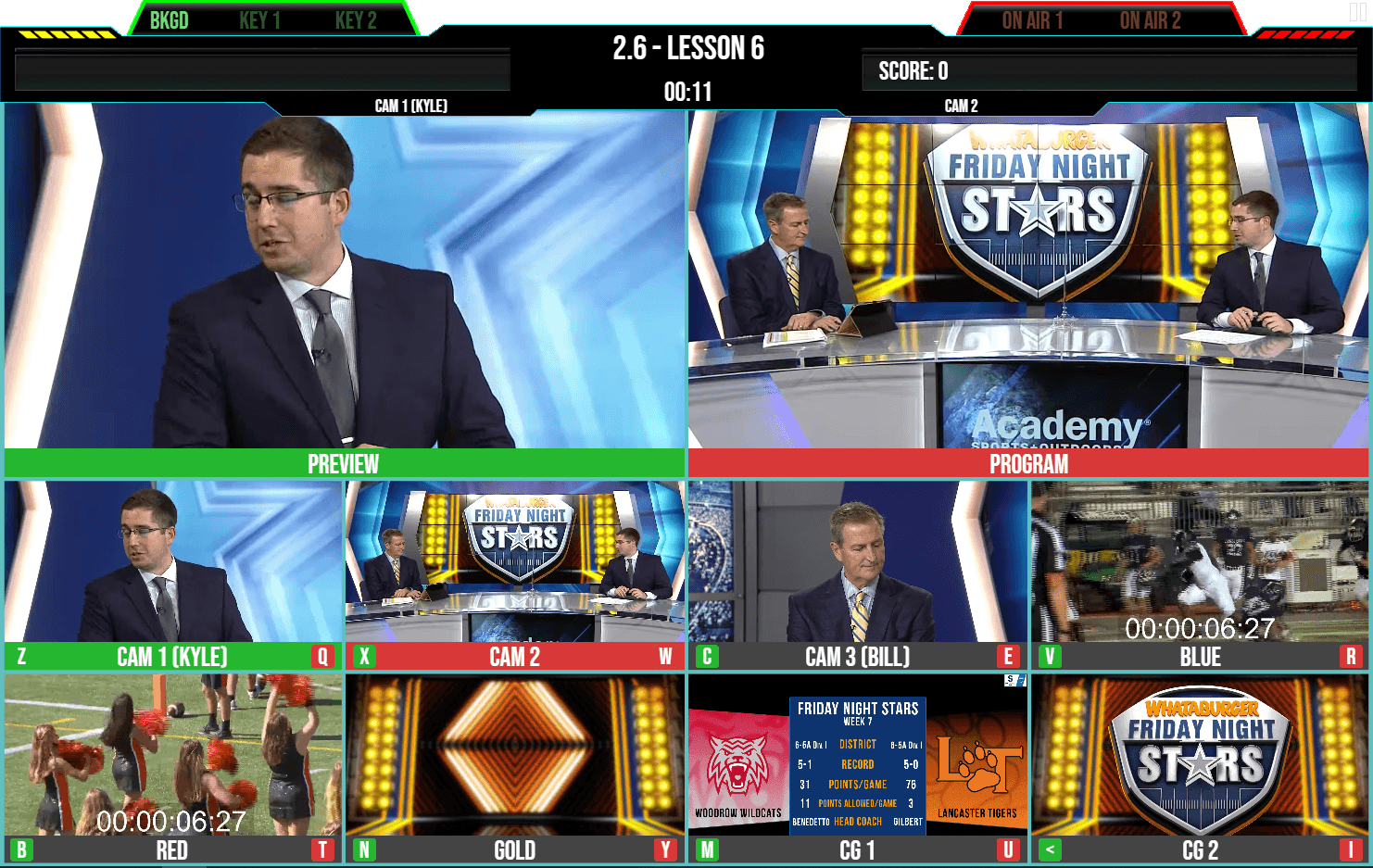
Each simulation looks and works like professional broadcast equipment and runs on real event footage. Here, a SwitcherSIM student cuts between cameras, video rolls, and graphics on a Friday night football show.
A SwitcherSIM lesson: preview, program, and every source a technical director works with
From the Classroom to Game Night
Learn the Role
Students work through lessons on realistic production interfaces built from real event footage. Built-in feedback shows them what worked and what to fix.
Train as a Crew
Multi-player sessions put students in different seats at the same time, so a class practices together like a real production crew.
Go Live on HometownLive
When they are ready, the same students run your live games on HometownLive, with fans watching at home, on the app, and on Roku.
Ready to Teach on Day One
- Lesson plans with learning objectives and step-by-step instructions
- Student readings with built-in industry vocabulary
- Quizzes, rubrics, reflection prompts, and performance-based assessments
- Capstone projects that pull every skill together
- Lessons that build from the basics to multi-camera productions
- Educator dashboard to assign simulations and track progress
BroadcastSIMS with HometownLive
Included with the All Access package, or add it to any HometownLive plan.
BroadcastSIMS is eligible for Carl D. Perkins CTE funding, which can cover up to the full cost for qualifying programs.
Broadcast Curriculum FAQ
- BroadcastSIMS is a suite of six browser-based simulations that teach live broadcast production. Students take a production role (technical director, replay operator, audio engineer, graphics operator, or director) and practice it on realistic interfaces with real event footage.
- No. BroadcastSIMS runs in a web browser on computers, laptops, and Chromebooks, so a whole class can train at once without a control room.
- No. Every simulation comes with lesson plans, readings, vocabulary, rubrics, and assessments, so a teacher can run the course without building materials from scratch.
- Students build their skills in the simulations, then put them to work running your live games on HometownLive. Your stream gets a trained crew and your students get real broadcast experience.
- BroadcastSIMS is included with the HometownLive All Access package and is available as a $995/year add-on for other plans. It is eligible for Carl D. Perkins CTE funding.